Screen sharing software |
|
|
ScreenCamera.Net transforms your webcam into a live streaming studio. With ScreenCamera.Net, you can stream video from the webcam, screen capture, movies, and audio files. You can also overlay images and text over live video. ScreenCamera.Net can capture the computer screen from all monitors with a specialized toolbar to help you manage what you intend to grab from the screen. |
|
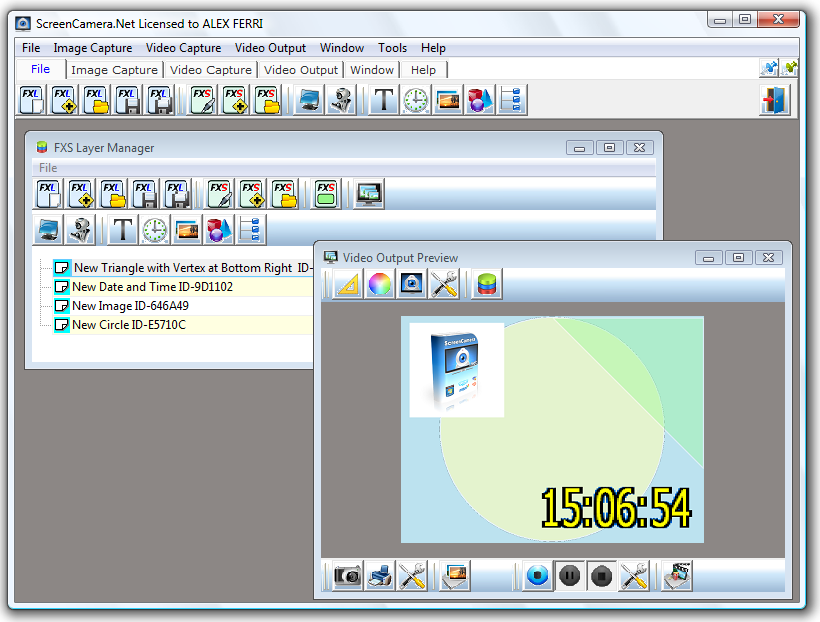
ScreenCamera.Net works by layers allowing you to switch between layers with one click or superimpose them. You can, for example, switch from webcam video to screen capture with one click, or you can have both screen capture and webcam video on the same shot. You can change a layer's size, position, rotation, and transparency. |
|
|
|
ScreenCamera.Net allows you to overlay transparent images and text over the video to brand your content. ScreenCamera.Net also will enable you to overlay a customizable date time stamp over the video. Regarding text, ScreenCamera.net supports a large number of fonts. |
|
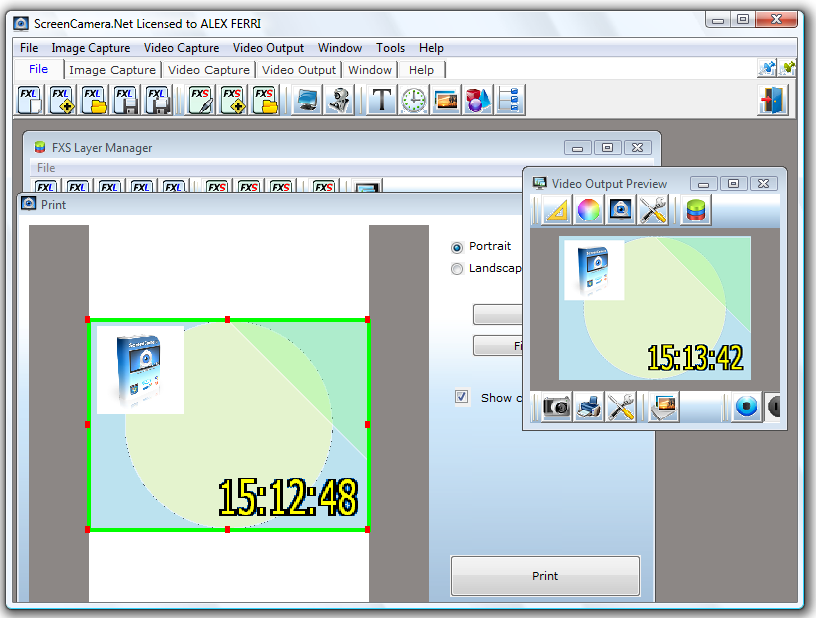
ScreenCamera.Net is compatible with YouTube, Facebook, Linked In, and all applications and websites that work with webcams. ScreenCamera.Net allows you to capture photos and record video from the camera. Additionally, ScreenCamera.Net comes with a built-in image printer module for high-accuracy photo printing. |
|
|
Main Features: |
|
ScreenCamera.Net supports video capture cards to capture TV channels or external devices connected to the boards, such as Camcorders, Video mixers, and even VCRs. Getting your setup ready is easy after you watch some introductory videos here. Once your structure is ready to go live, everything is always one or two clicks away. It operates by making layers visible and invisible, thus switching from scenes with a few clicks. |